Percentage calculator
Pick a calculation, type your numbers and the answer updates as you type, with the formula and each step shown. Nothing to install and no account.
Try an example
Each one loads into the calculator above.
Percentage formulas
How we calculate| Question | Formula | Example |
|---|---|---|
| X% of Y | Y × X ÷ 100 | 15% of 60 = 9 |
| X is what % of Y | X ÷ Y × 100 | 12 of 48 = 25% |
| X is P% of what | X ÷ P × 100 | 18 is 40% of 45 |
| % change from A to B | (B − A) ÷ |A| × 100 | 80 → 92 = +15% |
| % difference of A and B | |A − B| ÷ ((A + B) ÷ 2) × 100 | 40 and 60 = 40% |
| Add P% to X | X × (1 + P ÷ 100) | 250 + 8% = 270 |
| Subtract P% from X | X × (1 − P ÷ 100) | 250 − 8% = 230 |
| Value before a P% rise | Final ÷ (1 + P ÷ 100) | 126 after +20% → 105 |
Calculators for one job
The calculator above has every mode. These pages focus on one kind of question and explain it in more detail.
- Percent of a numberFind X% of any number, or the total when you know a part.
- What percent is X of YTurn a part and a total into a percentage.
- Percentage increaseMeasure growth from an old value to a new one, or add a percentage.
- Percentage decreaseMeasure a drop between two values, or take a percentage off.
- Percentage differenceCompare two values when neither one is the baseline.
- Reverse percentageFind the original value before a percentage was added or taken off.
- Percentage pointsTell a change in percentage points from a percent change.
- DiscountSale price and savings, including a second stacked discount.
- Sales taxAdd sales tax to a price or take it out of a total.
- VATAdd VAT to a net price or extract it from a gross price.
- TipTip amount, total and an even split between people.
- Margin and markupProfit margin and markup from cost and price, or a price for a target margin.
What a percentage is
A percentage is a number out of 100. 35% means 35 out of every 100, which is the fraction 35/100 or the decimal 0.35. Any percentage calculation is a way of comparing a part to a whole on that common scale.
Most questions come in one of three forms. You know the percentage and the whole and want the part (what is 35% of 200?). You know the part and the whole and want the percentage (70 is what percent of 200?). Or you know the part and the percentage and want the whole (70 is 35% of what?). The first three modes in the calculator cover those.
Change, difference and points
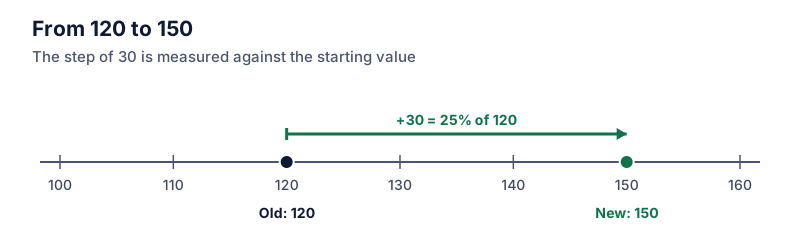
When a value moves from an old number to a new one, the percentage change divides the move by the old number. A price that goes from $80 to $92 rose by $12, and $12 is 15% of $80. If you only have two numbers and neither one is the starting point, use percentage difference instead.
When the numbers you are comparing are already percentages, such as an interest rate going from 4% to 5%, say which measure you mean. That is a rise of 1 percentage point, and also a 25% increase in the rate.
Guides
All 100 guides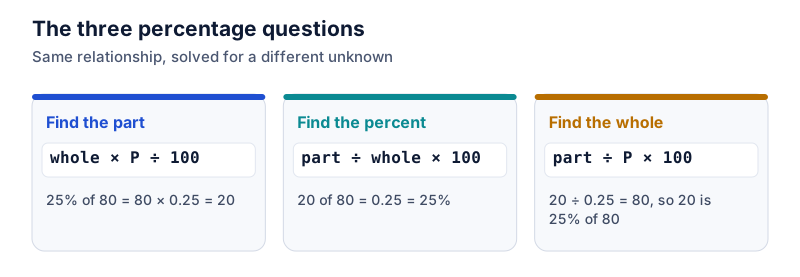 Percentage basics
How to calculate a percentage: the three formulas you need
Every basic percentage question is one of three shapes: find the part, find the percentage, or find the whole. Here's how to tell which one you have.
 Increase and decrease
How to calculate percentage increase
Subtract the old value from the new one, divide by the old value, and multiply by 100. Worked examples with prices, rent and scores, plus a quick way to check the answer.
 Discounts and shopping
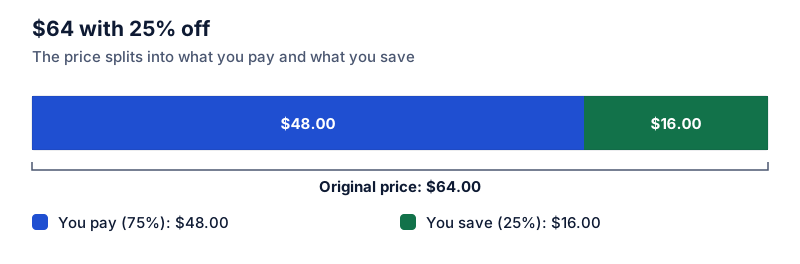
How to calculate a discount: sale price and savings
To find a sale price, multiply the original price by 1 minus the discount. Two methods, mental shortcuts for common discounts, and how to check what you'll pay.
 Increase and decrease
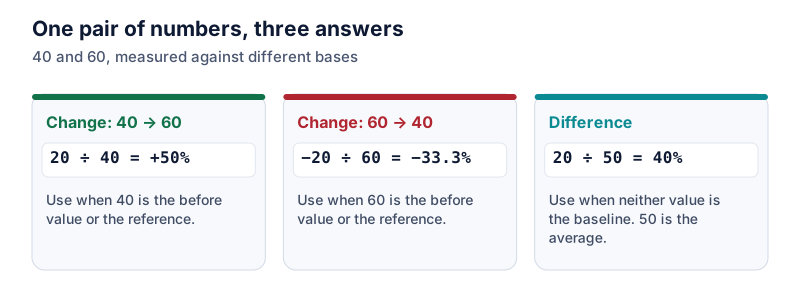
Percentage change vs percentage difference: which one to use
Use percentage change when one value is clearly the starting point, and percentage difference when neither is. The same pair of numbers worked both ways.
 Percentage basics
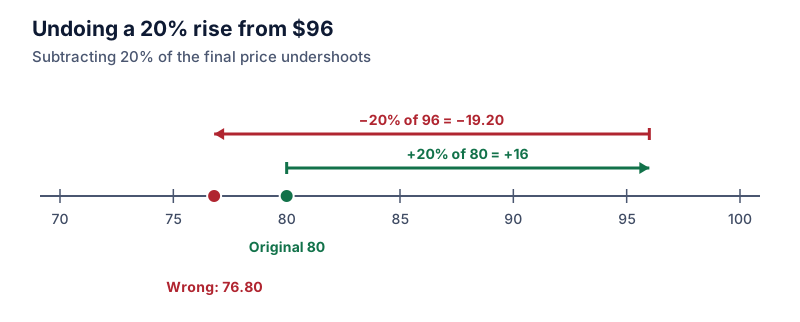
Reverse percentages: how to find the original number
To undo a percentage change, divide by the multiplier instead of subtracting the percentage. Why the obvious method fails, and how to check your answer.
 Spreadsheets
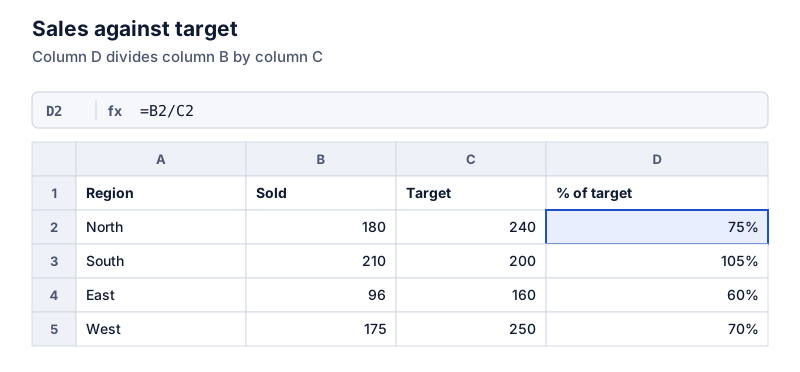
How to calculate a percentage in Excel
The basic Excel percentage formula is =part/whole, formatted as a percentage. Copy-ready formulas for percent of target, percent of a number, increases, decreases and percentage change, with a worked sheet.
How the calculator works
- Exact decimal math
Numbers are stored as whole-number digits with a decimal position, not as floating-point values, so 0.1 + 0.2 comes out as 0.3.
- The working is shown
Each answer comes with the formula, the steps with your numbers, and a plain sentence you can copy.
- Links reopen the result
Copy link saves the calculation type and the values in the address, so the page opens with the same numbers.
Common questions
How do I calculate a percentage of a number?
Divide the percentage by 100 and multiply by the number. 15% of 60 is 0.15 × 60 = 9. The “% of a number” mode does this and shows the step.
What is the difference between percentage change and percentage difference?
Percentage change has a direction: it measures the move from an old value to a new one, divided by the old value. Percentage difference compares two values with no starting point, so it divides by their average. Going from 40 to 60 is a 50% increase, while the percentage difference between 40 and 60 is 40%.
Why are some answers rounded?
On the Automatic setting, percentages and plain numbers show up to 6 decimal places and money shows 2. When the exact answer is longer, a note says it was rounded. You can pick a fixed number of decimal places in Settings.
Are the numbers I type sent anywhere?
No. The calculator runs in your browser and does not send your inputs to a server. Recent calculations are saved in your browser only if that setting is on, and you can clear them. A shared link contains the values in its address, so anyone you send it to can see them.