Margin and markup calculator
Enter a cost and a selling price to get the profit, the margin and the markup. The second tab works the other way: give it a cost and the margin you want, and it finds the price.
Profit margin and markup
Settings
Profit margin
Selling at $60.00 with a cost of $40.00 gives a 33.333333% margin and a 50% markup.
Rounded to 2 decimal places- Profit
- $20.00
- Markup
- 50%
Formula
Margin % = (Price − Cost) ÷ Price × 100; Markup % = (Price − Cost) ÷ Cost × 100
Steps
- Profit: $60.00 − $40.00 = $20.00
- Margin: 20 ÷ 60 × 100 = 33.333333%
- Markup: 20 ÷ 40 × 100 = 50%
- Margin divides profit by the selling price. Markup divides it by the cost. For the same sale, markup is always the larger number when there's a profit.
Recent calculations
Exact decimal arithmetic, calculated in your browser.
Examples
Each one loads into the calculator above.
Margin and markup are different percentages
Both start from the same profit: selling price minus cost. Margin divides that profit by the selling price. Markup divides it by the cost.
A product that costs $40 and sells for $60 makes $20 profit. The margin is 20 ÷ 60 = 33.33%, and the markup is 20 ÷ 40 = 50%. Neither is wrong, but mixing them up leads to prices that miss their target.
Pricing for a target margin
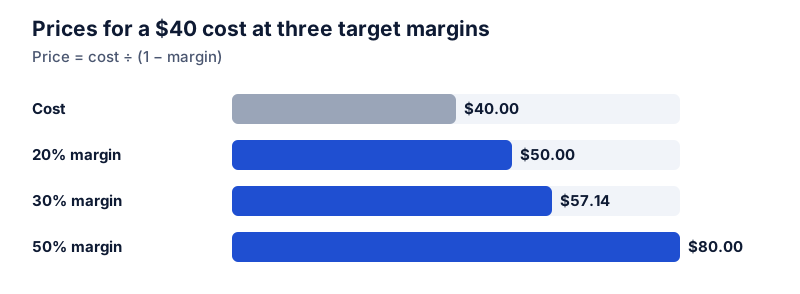
Divide the cost by 1 minus the target margin. For a 30% margin on a $40 cost: 40 ÷ 0.7 = $57.14. Adding 30% to the cost ($52) gives a margin of only 23%.
Converting between the two
- Margin = markup ÷ (1 + markup)
- Markup = margin ÷ (1 − margin)
A 50% markup is a 33.3% margin, and a 25% margin is a 33.3% markup.
What counts as cost
For a single product’s gross margin, cost usually means what you paid for the goods, including shipping to you. Operating and net margins subtract more costs, such as wages, rent and tax, and are calculated on the whole business. The calculator uses whatever cost you give it, so be clear which margin you’re quoting.
Questions people ask
Guides that use this calculator
 Business and ecommerce
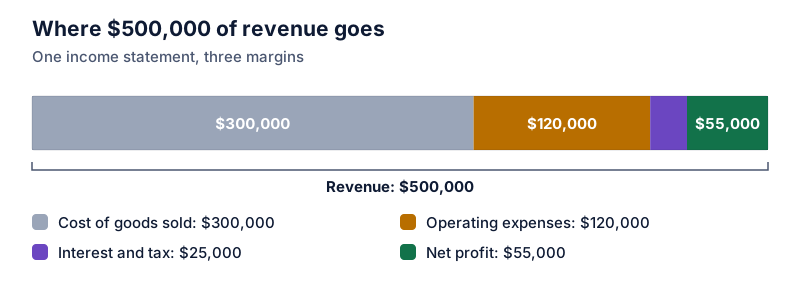
How to calculate profit margin
Profit margin is profit divided by revenue, times 100. Gross, operating and net margin worked from one income statement, plus the per-product version.
 Business and ecommerce
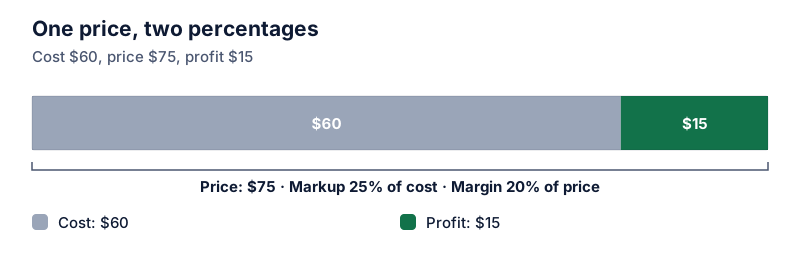
Markup vs margin: the difference and how to convert between them
Markup is profit divided by cost; margin is profit divided by price. The same sale gives different percentages. Conversion formulas both ways and a lookup table.
 Business and ecommerce
How to set a price for a target profit margin
To hit a target margin, divide the cost by 1 minus the margin. Why multiplying cost by 1 plus the margin falls short, and how discounts eat into margin.
 Business and ecommerce
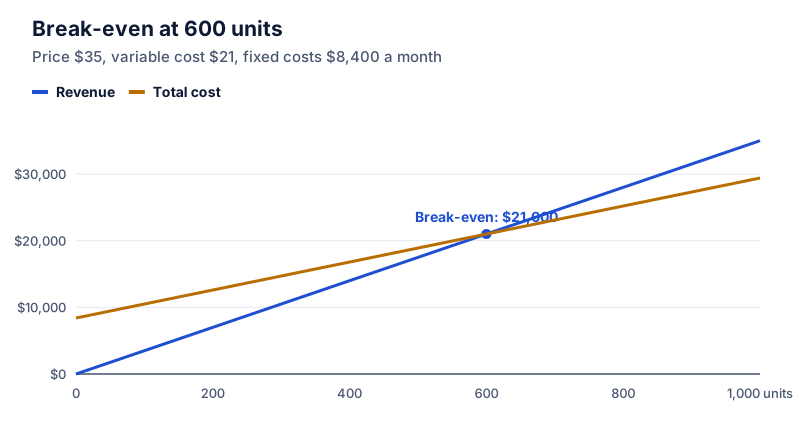
Contribution margin ratio and break-even sales
Contribution margin ratio = (price − variable cost) ÷ price. Use it to find break-even sales: fixed costs ÷ contribution margin ratio. A worked example with a target profit.