How to calculate a percentage in Excel
The basic Excel percentage formula is =part/whole, formatted as a percentage. Copy-ready formulas for percent of target, percent of a number, increases, decreases and percentage change, with a worked sheet.
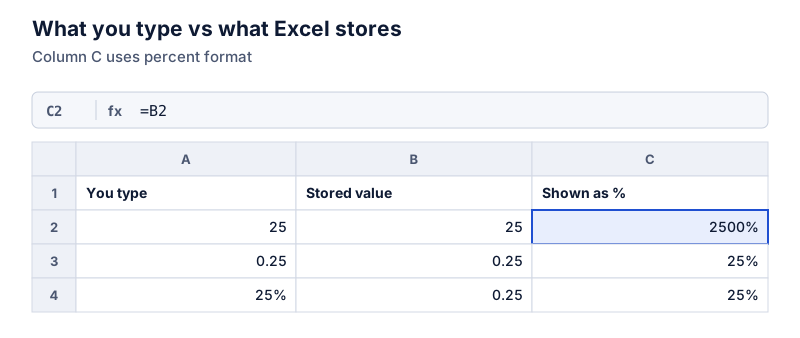
Type =B2/C2 to get the part as a share of the whole, then apply Percent Style (Home tab, or Ctrl+Shift+%). Don’t multiply by 100 when you use percent formatting, or 75% will show as 7500%. Other formulas: =B2C2 for a percent of a number, =B2(1+C2) to add a percentage.
On this page
Excel doesn’t have a “percentage function.” A percentage is a division, and Percent Style is a display format that multiplies by 100 and adds the % sign. Once that’s clear, every percentage formula is short.
The core formula: part ÷ whole
With the amount sold in B2 and the target in C2:
=B2/C2
Where apply Percent Style to show 0.75 as 75%
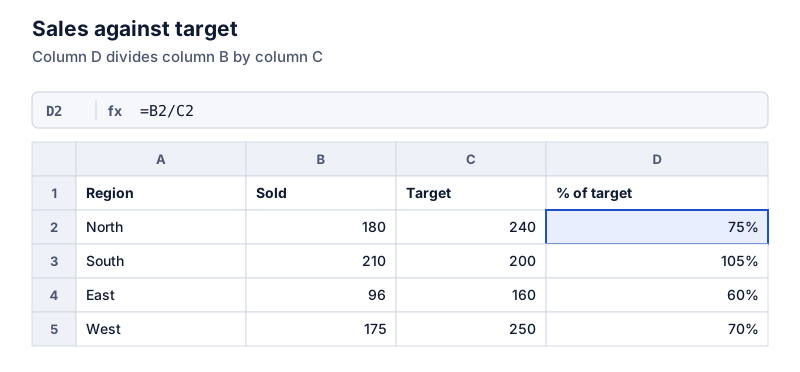
Check the first row:
Try it: 180 of 240
Open in calculatorSelect D2, then double-click the fill handle (the small square at the bottom right of the cell) to copy the formula down the column.
Applying percent format
- Home tab > Number group > % (Percent Style), or
- Ctrl+Shift+% on Windows, or
- Format Cells > Percentage, where you can also set decimal places.
If you type 25% directly into a cell, Excel stores 0.25 and formats it as a percentage. That makes it safe to use in other formulas.
Formulas for other questions
| Question | Formula | Example |
|---|---|---|
| What percent is B of C? | =B2/C2 |
180 of 240 → 75% |
| What is C% of B? | =B2*C2 |
15% of 80 → 12 |
| Add C% to B | =B2*(1+C2) |
80 + 15% → 92 |
| Subtract C% from B | =B2*(1-C2) |
80 − 15% → 68 |
| Change from B to C | =(C2-B2)/B2 |
80 → 92 → 15% |
| B is C% of what? | =B2/C2 |
12 ÷ 15% → 80 |
In each case, C2 holds a percentage typed as 15% (stored as 0.15). If C2 holds the plain number 15, divide it by 100 in the formula: =B2*C2/100.
Avoiding errors
- Division by zero. If a target can be zero or blank, wrap the formula:
=IFERROR(B2/C2,""), or test first with=IF(C2=0,"",B2/C2). - Numbers stored as text. Imported data sometimes treats numbers as text, and the formula returns #VALUE!. Convert the column to numbers first.
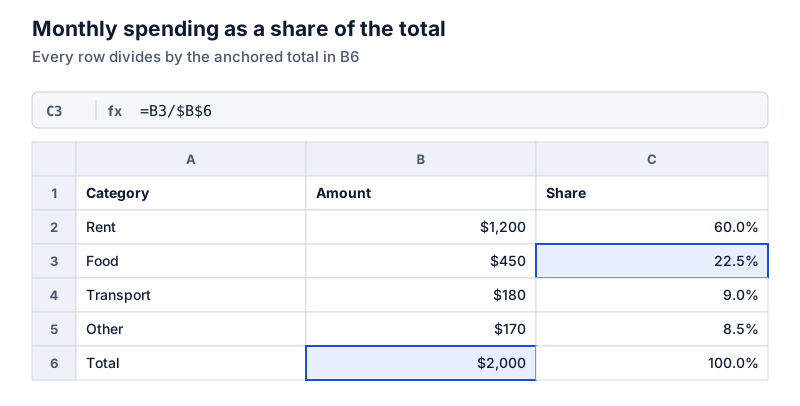
- Totals. For a percent-of-total column, the total cell needs a fixed reference such as
$B$10. See percentage of total in Excel.
Next steps
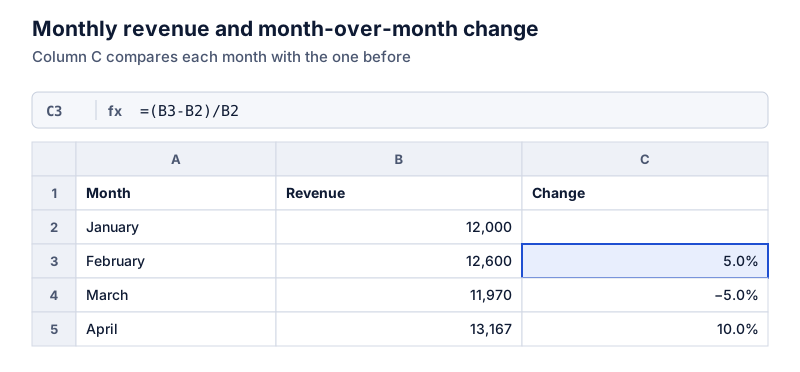
- Percentage change formula for month-to-month changes
- Format problems, like 2500% instead of 25%
- Common spreadsheet percentage errors
Questions
Should I multiply by 100 in Excel?
Only if you’re not using percent formatting. =B2/C2*100 gives 75 as a plain number. =B2/C2 with Percent Style gives 75%. Mixing the two gives 7500%.
How do I show decimal places in a percentage?
Use Increase Decimal on the Home tab, or Format Cells > Percentage and set the decimal places. Formatting changes only the display; the stored value keeps its full precision.
The calculator links in this guide are checked against the PercentSwift calculator every time the site is built. How we calculate explains the rounding rules. If you spot a mistake, email hello@percentswift.com.