How to calculate percentages in Google Sheets
Percentage formulas in Google Sheets: =A2/B2 with Format as percent, COUNTIF for the share of responses, TO_PERCENT, and ARRAYFORMULA for a whole column. Worked example with survey answers.
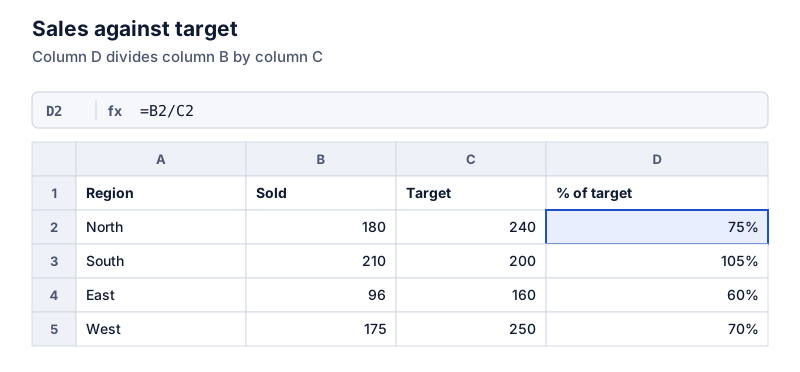
In Google Sheets, divide the part by the whole (=B2/C2) and click Format as percent (the % button) or press Ctrl+Shift+5. For the share of rows matching a value, use =COUNTIF(A2:A41,“Yes”)/COUNTA(A2:A41). With 26 Yes answers out of 40, that’s 65%.
On this page
Google Sheets handles percentages the same way Excel does: the cell stores a decimal, and percent formatting displays it multiplied by 100. A few Sheets-specific tools make common tasks quicker.
Basic percentage
With a part in B2 and a whole in C2, type =B2/C2, then:
- click Format as percent (the % button in the toolbar), or
- press Ctrl+Shift+5 (Cmd+Shift+5 on a Mac), or
- choose Format > Number > Percent.
Use the decimal buttons next to % to show more or fewer places.
Share of rows that match
For survey answers in A2:A41, the share of “Yes” answers is:
=COUNTIF(A2:A41,“Yes”)/COUNTA(A2:A41)
Where COUNTA counts non-empty cells
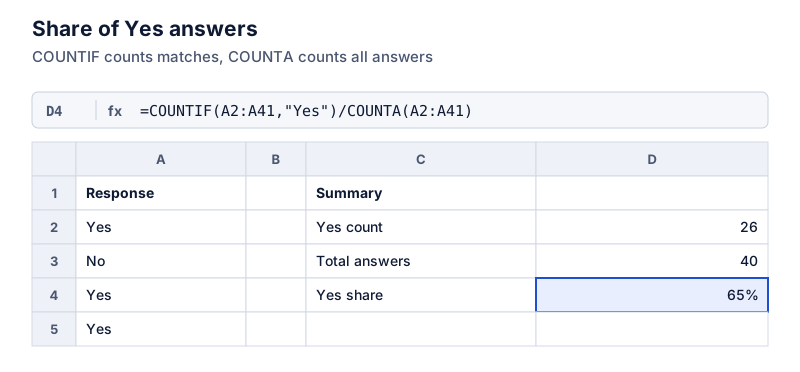
With 26 Yes answers out of 40:
Try it: 26 Yes answers of 40
Open in calculatorFor a share based on a number condition, such as orders over $100: =COUNTIF(B2:B200,">100")/COUNT(B2:B200).
TO_PERCENT
=TO_PERCENT(B2/C2) returns the value formatted as a percentage, which is useful inside a formula whose cell you don’t want to format by hand. It doesn’t change the stored value.
A whole column at once
Instead of filling a formula down, ARRAYFORMULA can fill a column from one cell:
=ARRAYFORMULA(IF(C2:C=“”, “”, B2:B/C2:C))
Where the IF leaves rows without a whole blank
Put it in D2, and leave the cells below it empty so the results have room.
Percent of total
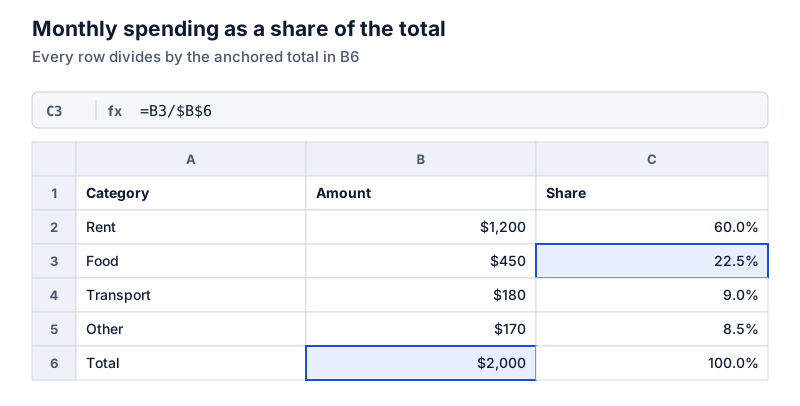
Lock the total with dollar signs, as in Excel: =B2/$B$10. Or compute the total inside the formula: =B2/SUM($B$2:$B$9). The details are in percentage of total in Excel, and they apply to Sheets too.
Typing percentages
Typing 15% stores 0.15 and formats it as a percent. Typing 15 into a cell already formatted as percent shows 15%, but it’s worth checking whether the stored value is 0.15 or 15 by looking at the formula bar or temporarily switching the format to Number. If you see 1500%, see percent format problems.
Charts
Sheets’ chart editor can show shares as a pie or a 100% stacked bar. See percentage charts in spreadsheets. For the general formulas, see percentage formulas in Excel.
Questions
Are Google Sheets and Excel percentage formulas the same?
The arithmetic formulas are identical: =B2/C2, =B2*(1+C2) and so on work in both. Sheets adds a few functions of its own, such as TO_PERCENT and ARRAYFORMULA, and the keyboard shortcuts differ slightly.
Why does COUNTIF return 0?
Check for extra spaces or different spelling in the cells, such as "Yes " with a trailing space. COUNTIF isn’t case-sensitive, but it does need the text to match. TRIM can clean the column first.
The calculator links in this guide are checked against the PercentSwift calculator every time the site is built. How we calculate explains the rounding rules. If you spot a mistake, email hello@percentswift.com.