How to increase or decrease a number by a percentage
To add a percentage to a number, multiply by 1 plus the percentage; to take it off, multiply by 1 minus it. One step instead of two, with examples.
To increase a number by P%, multiply it by (1 + P ÷ 100). To decrease it, multiply by (1 − P ÷ 100). 250 increased by 8% is 250 × 1.08 = 270. 250 decreased by 8% is 250 × 0.92 = 230.
On this page
You can add or take off a percentage in two steps: find the percentage, then add or subtract it. Or you can do it in one step with a multiplier.
increase: number × (1 + P ÷ 100)
decrease: number × (1 − P ÷ 100)
Two-step method
What is $250 plus 8%?
- 8% of 250 is 0.08 × 250 = 20.
- 250 + 20 = 270.
What is $250 minus 8%? 250 − 20 = 230.
One-step method
Adding 8% means you end up with 108% of the original, which is 1.08 times it. So 250 × 1.08 = 270. Taking 8% off leaves 92%: 250 × 0.92 = 230.
Try it: 250 plus 8%
Open in calculator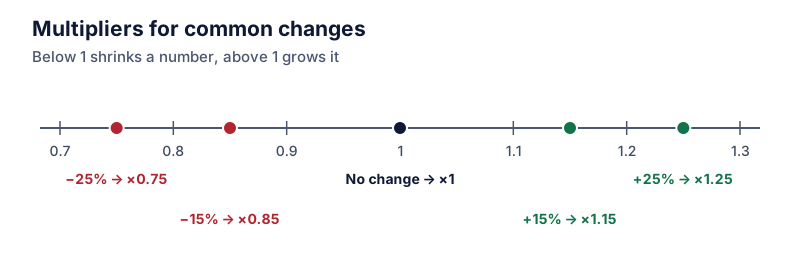
The one-step method is faster on a calculator, easier in a spreadsheet, and it’s the only practical way to apply several changes in a row. A price raised 8% and then 5% is 250 × 1.08 × 1.05 = 283.50.
Examples
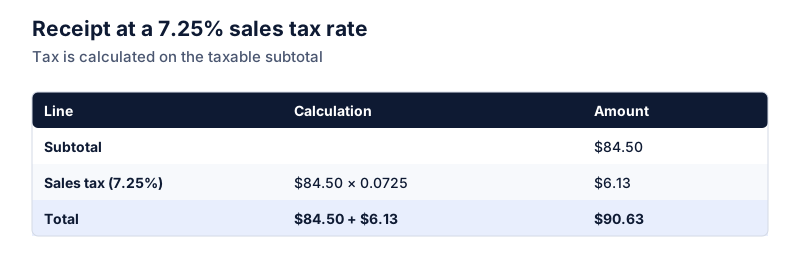
Sales tax. A $64 item with 7.25% tax: 64 × 1.0725 = $68.64.
Raise. A $52,000 salary with a 3.5% raise: 52,000 × 1.035 = $53,820.
Price cut. A $1,299 laptop with 15% off: 1,299 × 0.85 = $1,104.15.
Try it: $52,000 plus a 3.5% raise
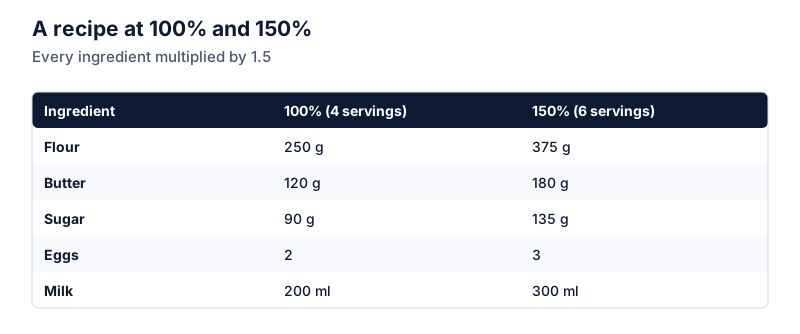
Open in calculatorRecipe. Scaling a 450 g flour quantity down by 20%: 450 × 0.8 = 360 g. See scaling recipes by a percentage.
Finding the multiplier
| Change | Multiplier |
|---|---|
| +3% | 1.03 |
| +12.5% | 1.125 |
| +100% | 2 |
| −5% | 0.95 |
| −30% | 0.70 |
| −100% | 0 |
For single-digit percentages, remember the zero: +7% is 1.07, not 1.7.
Don’t undo with the same percentage
If 270 is 250 plus 8%, taking 8% off 270 doesn’t give 250. It gives 270 × 0.92 = 248.40. To go back, divide by the multiplier: 270 ÷ 1.08 = 250. The reverse percentages guide explains why.
In a spreadsheet
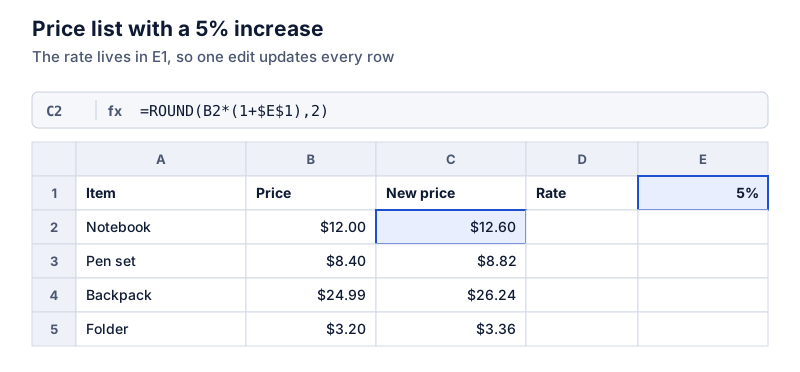
Put the number in A2 and the percentage in B2. Use =A2*(1+B2) to add it and =A2*(1-B2) to subtract it. If B2 holds the plain number 8 rather than 8%, divide by 100: =A2*(1+B2/100). More on this in adding a percentage in a spreadsheet, and for tax specifically, see how to calculate sales tax.
Questions
Is adding 10% and then subtracting 10% the same as doing nothing?
No. 100 × 1.1 × 0.9 = 99. The second change applies to the bigger number.
How do I add a percentage in Excel?
If the number is in A2 and the percentage in B2 (formatted as a percent), use =A2*(1+B2). To subtract, use =A2*(1-B2).
The calculator links in this guide are checked against the PercentSwift calculator every time the site is built. How we calculate explains the rounding rules. If you spot a mistake, email hello@percentswift.com.