Discount and sale price formulas for spreadsheets
Spreadsheet discount formulas: sale price =B2*(1-C2), discount percentage =1-D2/B2, savings =B2-D2, and stacked discounts =B2*(1-C2)*(1-D2). Worked product table with copy-ready formulas.
With the original price in B2 and the discount in C2 (as a percent): sale price =B2*(1-C2), amount saved =B2*C2. To find the discount from two prices, use =1-D2/B2 or =(B2-D2)/B2. An $85 item at 30% off is $59.50, and $59.50 from $85 is a 30% discount.
On this page
If you manage a product list, you need two things from a sheet: sale prices from discount percentages, and discount percentages from sale prices. Both are one-line formulas.
Sale price from a discount
=B2*(1-C2)
Where B2 is the original price, C2 the discount as a percentage
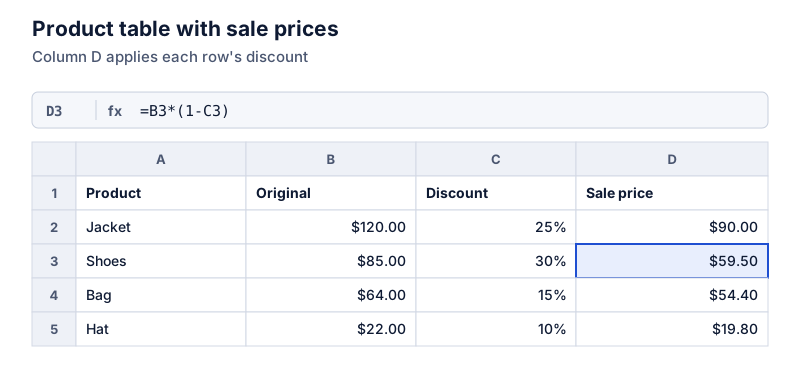
The shoes: $85 at 30% off.
Try it: $85 with 30% off
Open in calculatorAdd ROUND(…,2) if discounts can produce fractions of a cent.
Amount saved
=B2*C2, or =B2-D2 if you already have the sale price.
Discount percentage from two prices
When you know the original and sale prices but not the discount:
=1-D2/B2
Where format as a percentage
Or the equivalent =(B2-D2)/B2.
Try it: $85 down to $59.50
Open in calculatorStacked discounts
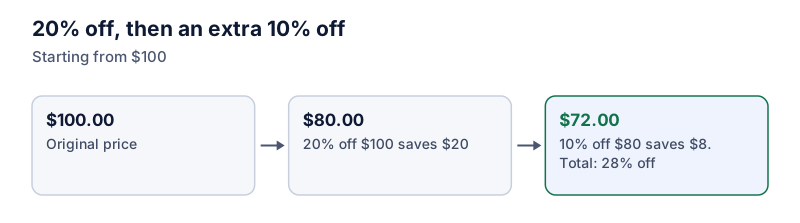
For 20% off followed by an extra 10% off at the register, multiply the two remaining shares:
=B2*(1-C2)*(1-D2)
Where C2 = 20%, D2 = 10%
On $120, that’s $120 × 0.8 × 0.9 = $86.40, which is 28% off in total, not 30%. The combined discount is =1-(1-C2)*(1-D2). See stacked discounts for more.
Minimum price or margin checks
To make sure no sale price drops below cost (in column E), add a check column: =IF(D2<E2,"Below cost",""). To see the margin at the sale price: =(D2-E2)/D2.
Rounding to price points
Many shops round sale prices to end in .99 or .00:
=ROUND(B2*(1-C2),0)rounds to the nearest dollar.=ROUNDUP(B2*(1-C2),0)-0.01gives a .99 ending.
Rounding changes the actual discount slightly, so recompute it with =1-D2/B2 if you advertise a percentage.
For raising prices instead, see adding a percentage in a spreadsheet. For the discount math itself, see how to calculate a discount.
Questions
How do I show the discount as "30% off" in a cell?
Use a custom number format like 0%" off" on the discount column. The cell still holds 0.3 and works in formulas.
Can I flag items whose discount is above a limit?
Yes. Use conditional formatting with a formula rule such as =C2>0.4 to highlight discounts over 40%, or a helper column with =IF(C2>0.4,“Check”,“”).
The calculator links in this guide are checked against the PercentSwift calculator every time the site is built. How we calculate explains the rounding rules. If you spot a mistake, email hello@percentswift.com.