How to measure a productivity change as a percentage
Measure productivity as output per hour, then compare before and after. Output up 15.5% with hours up 5% is a 10% productivity gain, not 15.5%. Worked example and formula.
Productivity change = (new output per hour − old output per hour) ÷ old output per hour × 100. A team that went from 1,200 units in 160 hours (7.5 per hour) to 1,386 units in 168 hours (8.25 per hour) improved productivity by 10%, even though output rose 15.5%.
On this page
After a new tool or process, output went up. But hours went up too. To know whether the team became more productive, compare output per hour, not output alone.
The formula
productivity = output ÷ hours
Where output is a count of work, such as units, orders or tickets
productivity change = (new − old) ÷ old × 100
Where new and old are output per hour
Worked example
A packing team handled 1,200 orders in 160 hours last month and 1,386 orders in 168 hours this month.
- Before: 1,200 ÷ 160 = 7.5 orders per hour.
- After: 1,386 ÷ 168 = 8.25 orders per hour.
- Change: (8.25 − 7.5) ÷ 7.5 × 100 = 10%.
Try it: 7.5 → 8.25 orders per hour
Open in calculator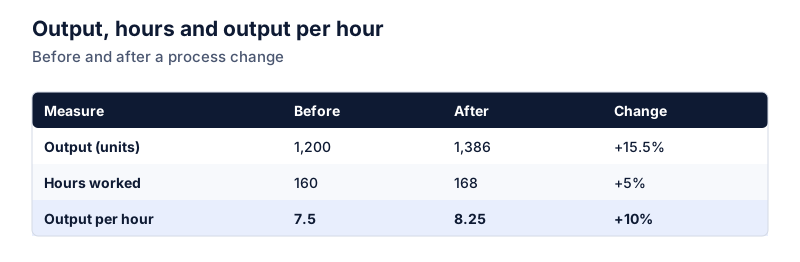
Why output alone overstates it
Output grew 15.5%:
Try it: 1,200 → 1,386 orders
Open in calculatorBut part of that came from working 5% more hours. The productivity gain is what’s left after accounting for the extra time:
productivity factor = output factor ÷ hours factor
Where 1.155 ÷ 1.05 = 1.10, a 10% gain
Things that distort the comparison
- Different mix of work. If this month had more simple orders, output per hour rises without any real improvement.
- Quality. More units with more returns or rework isn’t a clean gain. Track an error rate next to the productivity figure.
- Short periods. A single week can swing for random reasons. Compare several weeks before and after if you can.
- Hours recorded. Make sure both periods count hours the same way, including or excluding breaks and training.
Reporting it
State both numbers: “Output rose 15.5% while hours rose 5%, so output per hour improved 10%.” Readers can then see where the change came from. For the general difference between relative and absolute change, see absolute vs relative change. Basic increase calculations are covered in how to calculate percentage increase, and the time side in utilization rate.
Questions
Can I subtract the hours change from the output change?
As a rough estimate for small changes, yes: 15.5% − 5% = 10.5%, close to the true 10%. For larger changes the shortcut drifts, so divide the two growth factors instead.
What if output isn't easily counted?
Pick a measurable proxy that tracks the work, such as tickets resolved, orders shipped or pages edited, and keep the definition the same in both periods. Watch for quality changes, which a simple count won’t capture.
The calculator links in this guide are checked against the PercentSwift calculator every time the site is built. How we calculate explains the rounding rules. If you spot a mistake, email hello@percentswift.com.