VAT and sales tax formulas in spreadsheets
Spreadsheet VAT formulas: VAT =ROUND(B2*$F$1,2), gross =B2+C2, net from gross =ROUND(D2/(1+$F$1),2). An invoice layout that rounds per line and still adds up, plus mixed rates.
Keep the VAT rate in one cell (F1 = 20%). Per line: VAT =ROUND(B2*$F$1,2), gross =B2+C2. To remove VAT from a gross price: net =ROUND(D2/(1+$F$1),2) and VAT =D2-net. Rounding the VAT, then adding, keeps every line and the totals consistent.
On this page
Invoices and price lists in spreadsheets need VAT formulas that round to the cent and still add up. The approach below works in Excel and Google Sheets. US sales tax works the same way: put the combined sales tax rate in the rate cell and every formula below still applies.
Layout
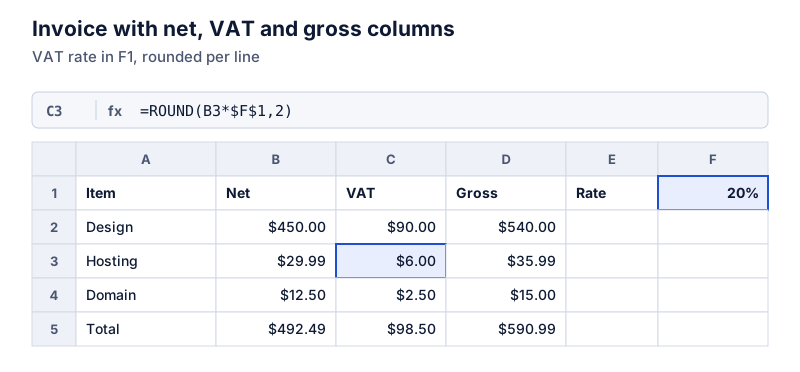
Put the rate in one cell (F1, typed as 20%), and use columns for net, VAT and gross. Lock the rate cell with dollar signs so it doesn’t shift when you fill down.
Adding VAT to a net price
=ROUND(B2*$F$1,2)
Where VAT on the net price in B2, rounded to cents
=B2+C2
Where gross = net + VAT
The hosting line: $29.99 net at 20%:
Try it: $29.99 net plus 20% VAT
Open in calculatorCalculating gross as net + rounded VAT, rather than =B2*1.2, guarantees that the three columns agree on every line.
Removing VAT from a gross price
=ROUND(D2/(1+$F$1),2)
Where net from the gross price in D2
Then VAT is =D2-B2. Getting the VAT by subtraction keeps net + VAT equal to the gross amount even after rounding.
Taking the VAT out of the invoice total:
Try it: Remove 20% VAT from $590.99
Open in calculatorMixed rates
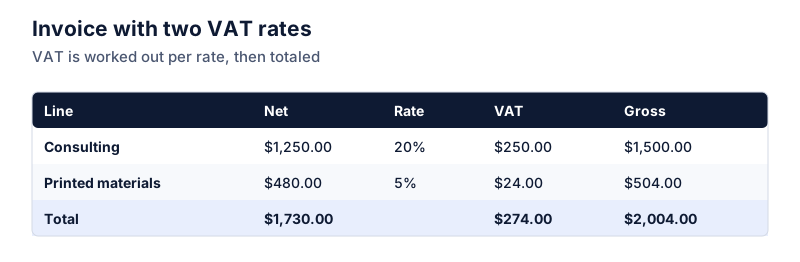
If lines carry different rates, add a rate column (E) and reference it relatively: =ROUND(B2*E2,2). For a VAT summary by rate, use SUMIF: =SUMIF(E2:E20,20%,C2:C20) totals the VAT on all 20% lines.
Totals
Sum each column: =SUM(B2:B4), =SUM(C2:C4), =SUM(D2:D4). With per-line rounding, gross total = net total + VAT total exactly. If you instead compute VAT on the net total, it can differ by a cent from the sum of the lines; here 20% of $492.49 is $98.498, which also rounds to $98.50.
Common mistakes
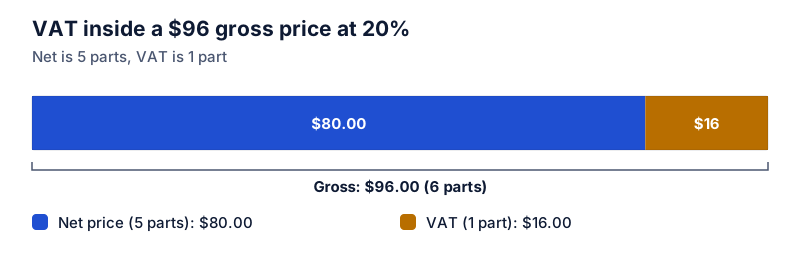
- Removing VAT by multiplying by 0.8. That takes 20% of the gross. The VAT inside a 20% gross price is one-sixth of it. See removing VAT from a price.
- Rate typed as 20 instead of 20%. The formula then multiplies by 20. Either type 20% or divide by 100.
- Formatting instead of rounding. Two-decimal formatting hides fractions of a cent that still affect totals.
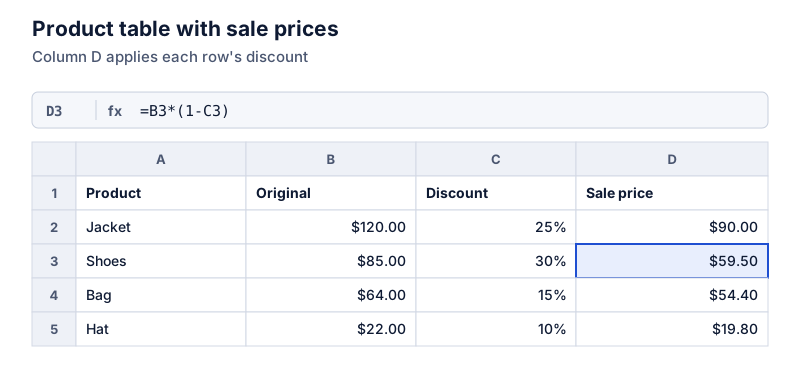
For the VAT math itself, see how to calculate VAT. For sale prices in the same kind of sheet, see discount formulas.
Questions
Should I round VAT on each line or on the invoice total?
Tax authorities set the rules, and many accept either if used consistently. Per-line rounding keeps every line self-contained; total-level rounding can differ from the sum of lines by a cent or so. Check the guidance where you invoice.
Why use ROUND instead of just formatting to two decimals?
Formatting only changes the display. The cell still holds 5.998, and totals add the unrounded values, which can make printed columns appear not to add up by a cent.
The calculator links in this guide are checked against the PercentSwift calculator every time the site is built. How we calculate explains the rounding rules. If you spot a mistake, email hello@percentswift.com.