How to calculate project completion percentage
Percent complete = work done ÷ total work × 100. Weight tasks by effort, not by count: a project with 1 of 4 tasks finished can be 45% done. Worked example, formulas, and common reporting pitfalls.
Weight each task by its estimated effort. If a project has 220 estimated hours and the finished work accounts for 100 of them, it’s 100 ÷ 220 × 100 = 45.5% complete. Counting tasks instead (1 of 4 done = 25%) ignores that tasks differ in size.
On this page
“How far along are we?” sounds like a simple question. The answer depends on what you count. Counting tasks treats a one-hour job the same as a three-week one, so it’s usually better to weight by effort.
The formula
percent complete = work done ÷ total work × 100
Where work is measured in a consistent unit such as estimated hours
Worked example
A website project has four tasks with estimated hours:
| Task | Estimate | Progress | Hours done |
|---|---|---|---|
| Design | 40 h | 100% | 40 |
| Build | 120 h | 50% | 60 |
| Test | 40 h | 0% | 0 |
| Launch | 20 h | 0% | 0 |
| Total | 220 h | 100 |
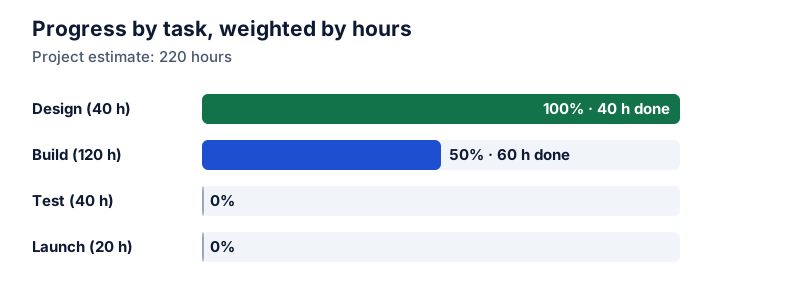
Try it: 100 of 220 hours done
Open in calculatorThe project is about 45% complete.
Why task counts mislead
Only one of four tasks is finished, so a task count says 25%:
Try it: 1 of 4 tasks done
Open in calculatorThat understates progress here, because the big Build task is half done. In other projects, it overstates it: finishing many small tasks early can show 70% “done” when the hardest work hasn’t started.
Other ways to weight
- Story points or size estimates in agile teams.
- Budget spent vs planned value in earned-value reporting. Money spent isn’t progress by itself, so compare it with work actually completed.
- Milestones with agreed weights, such as 10% for sign-off on design, 50% for a working build.
Whatever you use, use the same unit for the numerator and the denominator.
Reporting tips
- Say what the percentage is based on: “45% of estimated hours.”
- Show the remaining work in units too: 120 hours left.
- Re-estimate as you learn. A total that grows is useful information.
- Don’t confuse time elapsed with work done. Being halfway through the schedule doesn’t mean being halfway through the work. See time as a percentage.
For tracking a target number instead of a task list, see goal progress percentage. For team capacity, see utilization rate.
Questions
What if the estimates turn out to be wrong?
Update the total. If Build now looks like 160 hours instead of 120, the total becomes 260 and the same finished work is a smaller percentage. Percent complete can go down, and reporting that honestly is better than a number that stalls at 90%.
How do I estimate how far along a single task is?
Use something countable if you can, such as pages drafted or test cases passed. Otherwise, a simple 0% / 50% / 100% rule (not started, started, done) avoids over-optimistic guesses.
The calculator links in this guide are checked against the PercentSwift calculator every time the site is built. How we calculate explains the rounding rules. If you spot a mistake, email hello@percentswift.com.